
Introduction
Microsoft Copilot Studio has revolutionized how enterprises build and deploy conversational AI solutions. As the evolution of Power Virtual Agents, Copilot Studio empowers developers to create intelligent, context-aware chatbots that seamlessly integrate with Dynamics 365, Power Platform, and external systems. This comprehensive guide explores how developers can leverage Copilot Studio to build production-ready conversational AI experiences with custom topics, actions, and advanced integrations.
Whether you're a developer looking to enhance customer service automation, a technical manager evaluating AI solutions, or a solution architect designing enterprise chatbot strategies, this guide provides the technical depth and practical insights you need.
What is Microsoft Copilot Studio?
Microsoft Copilot Studio is a low-code platform that enables developers and business users to build sophisticated AI-powered chatbots without extensive machine learning expertise. It combines:
- Natural Language Understanding (NLU) powered by Azure AI
- Visual conversation design with a drag-and-drop interface
- Extensibility through custom actions and plugins
- Enterprise-grade security and compliance
- Seamless integration with Microsoft 365, Dynamics 365, and Power Platform
- Multi-channel deployment across websites, Teams, and messaging platforms
Key Capabilities for Developers
- Custom Topics - Define conversation flows with branching logic
- Actions & Plugins - Extend functionality with Power Automate flows and custom connectors
- Generative AI Integration - Leverage GPT models for dynamic responses
- API Connectivity - Connect to external systems and databases
- Authentication & SSO - Implement secure user authentication
- Analytics & Monitoring - Track performance and optimize conversations
Architecture Overview
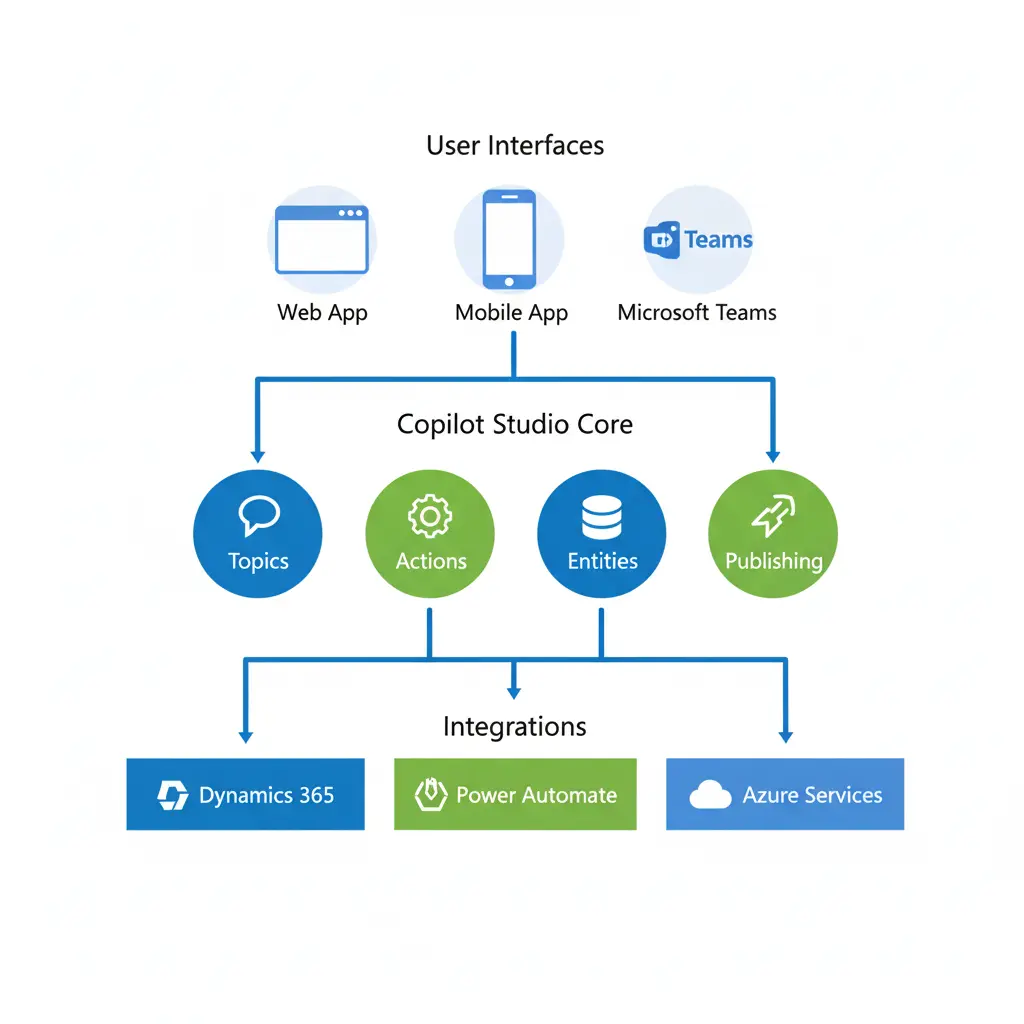
Understanding Copilot Studio's architecture is crucial for building scalable solutions:
User Interface Layer
    ├── Web Chat Widget
    ├── Microsoft Teams
    ├── Custom Channels (Facebook, Slack, etc.)
    └── Mobile Applications

Copilot Studio Core
    ├── NLU Engine (Intent Recognition)
    ├── Topic Management
    ├── Dialog Management
    └── Entity Recognition

Integration Layer
    ├── Power Automate Flows
    ├── Custom Connectors
    ├── Dataverse
    ├── Dynamics 365 APIs
    └── External REST APIs

AI & Data Services
    ├── Azure OpenAI (Generative Answers)
    ├── Azure Cognitive Services
    ├── Knowledge Sources
    └── Data Analytics
Building Custom Topics: A Developer's Approach

Understanding Topics
Topics are the fundamental building blocks of conversations in Copilot Studio. Each topic handles a specific user intent or scenario.
Anatomy of a Topic
- Trigger Phrases - Keywords and sentences that activate the topic
- Conversation Nodes - Questions, messages, conditions, and actions
- Entities - Data extraction from user input
- Variables - Store and pass data between nodes
- Conditions - Branching logic based on user responses
Creating a Custom Topic: Step-by-Step
Example: Order Status Inquiry Topic
Step 1: Define Trigger Phrases
- Check my order status
- Where is my order
- Track my shipment
- Order tracking
- What's the status of order number [OrderID]
Step 2: Extract Entities
Create a custom entity for Order ID:
- Name: OrderNumber
- Type: Regular expression or Pattern
- Pattern: ^ORD-[0-9]{6}$
Step 3: Build Conversation Flow
Node 1: Message
"I'll help you check your order status."

Node 2: Question (if OrderID not provided)
"Could you please provide your order number? It should look like ORD-123456"
    └── Save response to: var_OrderID (OrderNumber entity)

Node 3: Condition
IF var_OrderID is provided
    └── THEN: Proceed to Action
ELSE
    └── Message: "Please provide a valid order number"
    └── End conversation

Node 4: Action (Power Automate Flow)
"Call GetOrderStatus Flow"
    ├── Input: var_OrderID
    └── Output: var_OrderStatus, var_EstimatedDelivery

Node 5: Adaptive Response
IF var_OrderStatus == "Shipped"
    └── "Great news! Your order {var_OrderID} has been shipped and will arrive by {var_EstimatedDelivery}"
ELSE IF var_OrderStatus == "Processing"
    └── "Your order {var_OrderID} is currently being processed"
ELSE
    └── "I couldn't find order {var_OrderID}. Please verify the order number."
Advanced Topic Patterns
1. Multi-Turn Conversations with Context Retention
Global Variables:
- var_UserAuthenticated (Boolean)
- var_CustomerID (String)
- var_SessionContext (Object)

Topic Flow:
1. Authenticate user (if not authenticated)
2. Store context in session
3. Allow topic switching while maintaining context
4. Use context in subsequent interactions
2. Dynamic Topic Routing
Implement intelligent routing based on:
- User intent confidence scores
- Historical conversation data
- User profile and preferences
- Business rules and priorities
Creating Custom Actions and Plugins
Types of Actions in Copilot Studio
- Power Automate Flows - Pre-built or custom automation
- Custom Connectors - Connect to external APIs
- Skills - Reusable conversation components
- Code Components - Custom TypeScript/JavaScript logic
Building a Custom Action with Power Automate
Example: Customer Data Retrieval from Dynamics 365
Flow Structure:
Trigger: Copilot Studio (When an action is invoked)

Input Parameters:
- CustomerEmail (String, Required)
- IncludeOrderHistory (Boolean, Optional)

Actions:
1. Initialize Variables
   └── var_CustomerRecord (Object)
   └── var_OrderHistory (Array)

2. HTTP Request to Dynamics 365 Web API
   Method: GET
   URI: https://[org].api.crm.dynamics.com/api/data/v9.2/contacts
   Query: $filter=emailaddress1 eq '{CustomerEmail}'
   Headers:
       Authorization: Bearer {token}
       Accept: application/json

3. Parse JSON Response
   └── Store in var_CustomerRecord

4. Condition: Check if IncludeOrderHistory == true
   IF TRUE:
       └── HTTP Request: Get related orders
       └── Parse order data
       └── Store in var_OrderHistory

5. Compose Response Object
   {
       "CustomerName": var_CustomerRecord.fullname,
       "CustomerID": var_CustomerRecord.contactid,
       "AccountStatus": var_CustomerRecord.statuscode,
       "OrderCount": length(var_OrderHistory),
       "RecentOrders": var_OrderHistory
   }

6. Respond to Copilot Studio
   Return: Composed response object
Implementation in Copilot Studio:
Node: Action
Select Flow: "Get Customer Data"
Input Parameters:
    └── CustomerEmail: var_UserEmail
    └── IncludeOrderHistory: true

Output Variables:
    └── var_CustomerName
    └── var_CustomerID
    └── var_AccountStatus
    └── var_RecentOrders

Next Node: Message
"Hi {var_CustomerName}! I can see you have {var_RecentOrders.length} recent orders."
Building Custom Connectors
For external systems without pre-built connectors:
Prerequisites
- REST API endpoint
- Authentication method (OAuth 2.0, API Key, Basic Auth)
- API documentation
- SSL certificate (HTTPS required)
Custom Connector Configuration
json
{
  "swagger": "2.0",
  "info": {
    "title": "Order Management API",
    "version": "1.0",
    "description": "Custom connector for order system"
  },
  "host": "api.yourcompany.com",
  "basePath": "/v1",
  "schemes": ["https"],
  "consumes": ["application/json"],
  "produces": ["application/json"],
  "paths": {
    "/orders/{orderId}": {
      "get": {
        "summary": "Get Order Details",
        "operationId": "GetOrder",
        "parameters": [
          {
            "name": "orderId",
            "in": "path",
            "required": true,
            "type": "string"
          }
        ],
        "responses": {
          "200": {
            "description": "Success",
            "schema": {
              "$ref": "#/definitions/Order"
            }
          }
        }
      }
    }
  },
  "definitions": {
    "Order": {
      "type": "object",
      "properties": {
        "orderId": {"type": "string"},
        "status": {"type": "string"},
        "totalAmount": {"type": "number"},
        "estimatedDelivery": {"type": "string"}
      }
    }
  }
}
Integrating Generative AI Capabilities
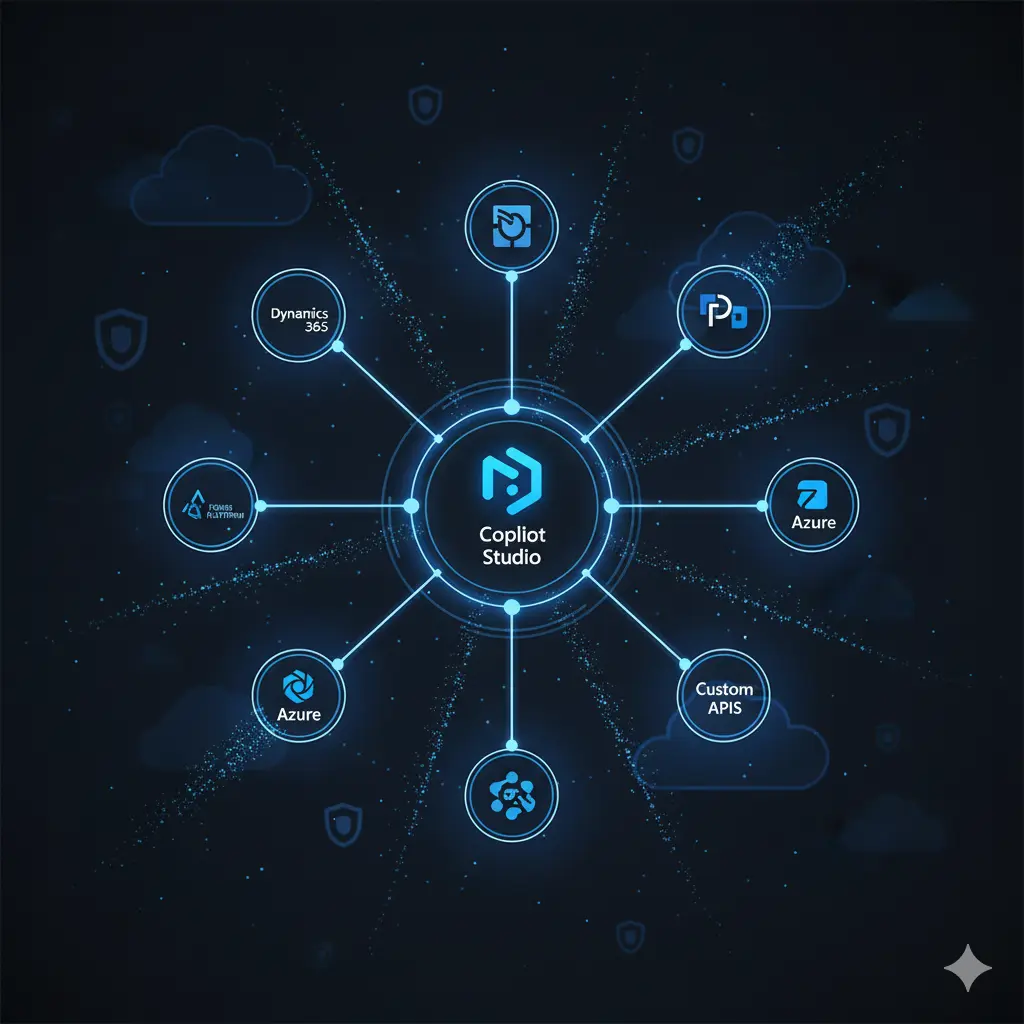
Leveraging GPT Models in Copilot Studio
Microsoft Copilot Studio integrates Azure OpenAI for generative answers:
Configuration Steps
Enable Generative Answers
- Navigate to Settings > Generative AI
- Toggle "Enable generative answers"
- Configure content moderation level
Connect Knowledge Sources
- Upload documents (PDF, DOCX, TXT)
- Connect SharePoint sites
- Link to public websites
- Add Dataverse records
Configure Boosted Conversations
- Define conversation starters
- Set up fallback topics
- Control when AI generates responses
Best Practices for Generative Responses
Topic: AI-Assisted Support

Node 1: Condition
IF user_query NOT matched by existing topics
    └── Trigger Generative Answers

Node 2: Generative Response
System Prompt:
"You are a helpful customer support assistant for [Company Name].
Base your answers on the provided knowledge sources.
If you don't know the answer, direct users to human support.
Be professional, concise, and helpful."

Knowledge Sources:
    ├── Product documentation
    ├── FAQ articles
    ├── Support knowledge base
    └── Company policies

Content Moderation: Medium
Max Response Length: 500 characters

Node 3: Feedback Collection
"Was this answer helpful?"
    ├── Yes → Log positive feedback
    └── No → Escalate to human agent
Hybrid Approach: Combining Scripted and Generative AI
Decision Flow:
1. User Input → Intent Recognition
2. IF high confidence match (>80%)
   └── Use scripted topic (deterministic)
3. ELSE IF medium confidence (50-80%)
   └── Use generative AI with specific prompt
4. ELSE IF low confidence (<50%)
   └── Ask clarifying question OR escalate
Authentication and Security

Implementing User Authentication
Authentication Methods
- Manual Authentication
Topic: Authenticate User

Node 1: Question
"To proceed, please provide your email address"
    └── Save to: var_UserEmail

Node 2: Question
"Please enter the verification code sent to your email"
    └── Save to: var_VerificationCode

Node 3: Action (Verify Code)
Power Automate Flow: VerifyUserCode
    ├── Input: var_UserEmail, var_VerificationCode
    └── Output: var_IsAuthenticated, var_UserID

Node 4: Condition
IF var_IsAuthenticated == true
    └── Set global variable: var_AuthenticatedUser
    └── Continue conversation
ELSE
    └── Message: "Authentication failed"
    └── End conversation
- OAuth 2.0 Integration
Configuration:
- Token endpoint URL
- Client ID and Secret (stored in Azure Key Vault)
- Scopes and permissions
- Redirect URI

Implementation:
1. Trigger OAuth login card
2. User authenticates with provider
3. Receive access token
4. Store token in session
5. Use token for API calls
- Single Sign-On (SSO) with Azure AD
Prerequisites:
- Azure AD tenant
- App registration
- User consent configuration

Flow:
User → Teams/Web → Azure AD Login → Token → Copilot Studio
                                      ↓
                            Extract user claims
                                      ↓
                            var_UserPrincipalName
                            var_UserObjectID
Security Best Practices
Data Privacy
- Never log sensitive information (passwords, credit cards)
- Implement data retention policies
- Use variable masking for PII
API Security
- Store credentials in Azure Key Vault
- Use managed identities
- Implement rate limiting
- Validate all inputs
Conversation Security
- Enable conversation transcripts encryption
- Implement session timeout
- Use HTTPS for all channels
- Regular security audits
Deployment and Channel Configuration
Multi-Channel Deployment Strategy
1. Web Chat Widget
html
<!-- Embed Code for Website -->
<script src="https://cdn.botframework.com/botframework-webchat/latest/webchat.js"></script>
<div id="webchat" role="main"></div>
<script>
  window.WebChat.renderWebChat(
    {
      directLine: window.WebChat.createDirectLine({
        token: 'YOUR_DIRECT_LINE_TOKEN'
      }),
      userID: 'USER_ID',
      username: 'Web Chat User',
      locale: 'en-US',
      styleOptions: {
        botAvatarBackgroundColor: '#0078D4',
        botAvatarInitials: 'CV',
        userAvatarBackgroundColor: '#00A4EF',
        bubbleBackground: '#F3F2F1',
        bubbleFromUserBackground: '#0078D4'
      }
    },
    document.getElementById('webchat')
  );
</script>
2. Microsoft Teams Integration
Deployment Steps:
1. Publish copilot to Teams
2. Configure app manifest
3. Set up bot registration
4. Define permissions and scopes
5. Submit for organization approval
6. Deploy to specific teams/channels

Teams-Specific Features:
- Adaptive Cards
- Task modules
- @mentions
- Proactive messaging
- Meeting integration
3. Custom Channel Implementation
javascript
// Custom channel using Direct Line API
const directLine = new DirectLine({
  secret: 'YOUR_DIRECT_LINE_SECRET'
});

directLine.postActivity({
  from: { id: 'user1', name: 'User' },
  type: 'message',
  text: 'Hello, Copilot!'
}).subscribe(
  id => console.log('Message sent with ID:', id),
  error => console.error('Error sending message:', error)
);

directLine.activity$
  .filter(activity => activity.type === 'message' && activity.from.id !== 'user1')
  .subscribe(
    message => console.log('Received:', message.text)
  );
Monitoring, Analytics, and Optimization
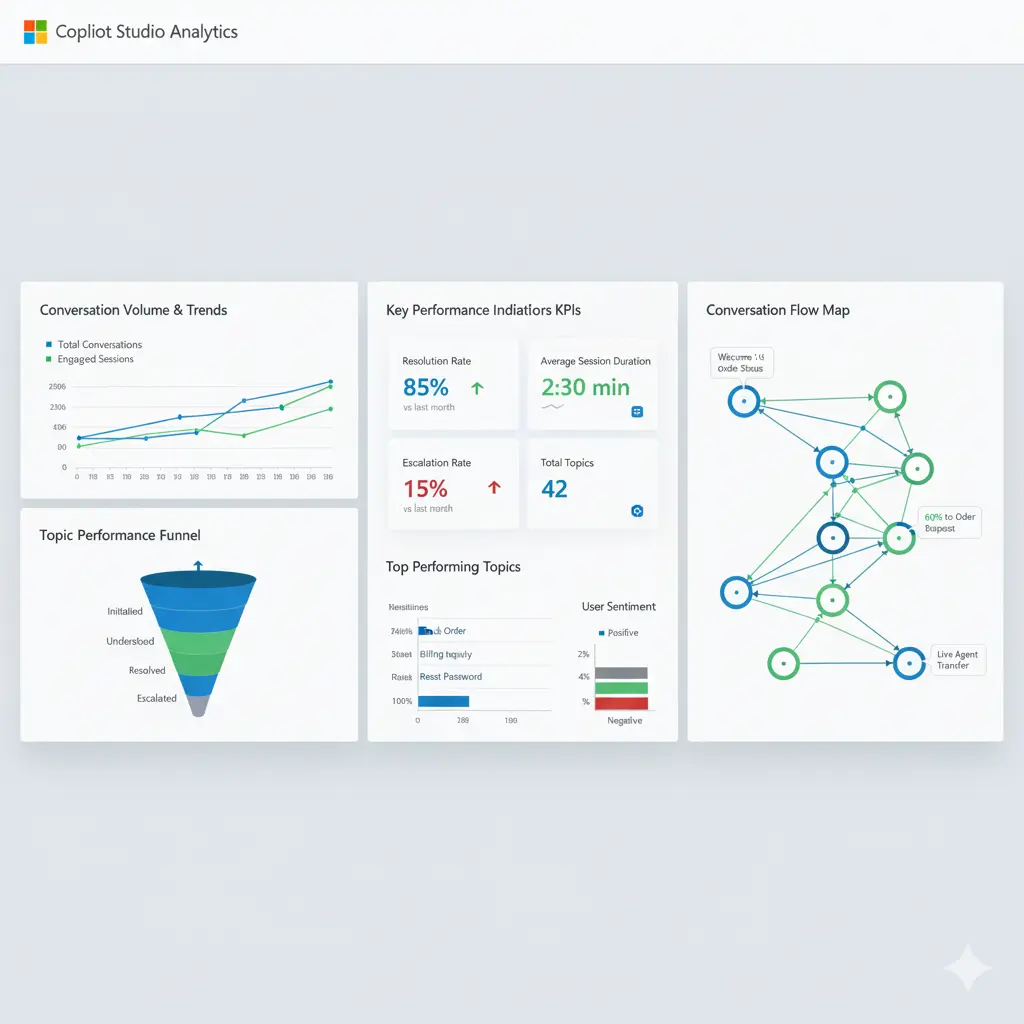
Key Performance Indicators (KPIs)
Engagement Metrics
- Total conversations
- Active users
- Conversation duration
- Messages per conversation
Resolution Metrics
- Resolution rate
- Escalation rate
- Abandonment rate
- First contact resolution
Topic Performance
- Topic trigger frequency
- Topic completion rate
- Average path length
- User satisfaction per topic
Analytics Configuration
Power BI Integration:

Data Sources:
├── Copilot Studio Analytics Connector
├── Dataverse conversation logs
└── Application Insights

Key Reports:
1. Conversation Volume Dashboard
   - Daily/weekly/monthly trends
   - Channel breakdown
   - Peak usage times

2. Topic Performance Report
   - Most triggered topics
   - Completion rates
   - Average resolution time
   - User satisfaction scores

3. Escalation Analysis
   - Escalation reasons
   - Topic gaps
   - User drop-off points

4. User Journey Visualization
   - Common conversation paths
   - Bottlenecks
   - Optimization opportunities
Continuous Improvement Process
Optimization Cycle:

1. Data Collection
   └── Gather conversation transcripts
   └── Track topic performance
   └── Monitor user feedback

2. Analysis
   └── Identify patterns
   └── Find failed conversations
   └── Detect missing topics

3. Enhancement
   └── Add new trigger phrases
   └── Create missing topics
   └── Improve response accuracy
   └── Optimize conversation flows

4. Testing
   └── A/B test variations
   └── User acceptance testing
   └── Performance validation

5. Deployment
   └── Staged rollout
   └── Monitor metrics
   └── Collect feedback

6. Repeat
Advanced Development Patterns
Pattern 1: Contextual Conversation Memory
Implementation:
1. Create custom Dataverse table: ConversationContext
   Fields:
   - ConversationID (Primary Key)
   - UserID
   - SessionData (JSON)
   - LastUpdated
   - ExpiresAt

2. Store context at each interaction
   Power Automate Flow: UpdateConversationContext
   Trigger: After each significant user input
   Action: Upsert record in ConversationContext

3. Retrieve context when needed
   Power Automate Flow: GetConversationContext
   Input: ConversationID
   Output: SessionData object

4. Use context in topics
   Node: Action → GetConversationContext
   Parse SessionData → Extract relevant variables
   Use in conversation logic
Pattern 2: Intelligent Handoff to Human Agents
Escalation Logic:

Trigger Conditions:
├── User explicitly requests human agent
├── Copilot confidence score < threshold
├── Conversation exceeds max turns
├── Negative sentiment detected
└── Complex query identified

Handoff Process:
1. Capture conversation summary
2. Identify user intent and context
3. Route to appropriate queue
4. Pass conversation history
5. Notify agent with context
6. Warm transfer (bot stays in loop)

Integration with Dynamics 365 Customer Service:
- Create case automatically
- Populate case with conversation transcript
- Tag case with intent/category
- Assign to right team
- Track resolution
Pattern 3: Proactive Messaging
Use Cases:
- Order status updates
- Appointment reminders
- Alert notifications
- Follow-up messages

Implementation:
1. Trigger from external system
   └── Order shipped → Trigger notification

2. Power Automate Flow: SendProactiveMessage
   Inputs:
   - UserID (or Teams/Channel address)
   - Message content
   - Message type (text, adaptive card)

3. Use Direct Line API or Graph API
   POST to Direct Line:
   {
     "type": "message",
     "from": {"id": "bot"},
     "recipient": {"id": "user123"},
     "text": "Your order ORD-123456 has been shipped!"
   }

4. Track delivery and engagement
Real-World Implementation Examples
Example 1: E-commerce Customer Support Copilot
Requirements:
- Handle order inquiries
- Process returns
- Provide product recommendations
- Escalate complex issues
Architecture:
Topics:
├── Order Status (with nopCommerce integration)
├── Return Request (create return case in D365)
├── Product Search (search nopCommerce catalog)
├── Shipping Information
├── Payment Issues (secure handling)
└── Escalation to Agent

Custom Actions:
├── GetOrderDetails (nopCommerce API)
├── CreateReturnRequest (Dynamics 365 Case)
├── SearchProducts (nopCommerce Search API)
├── ValidateCustomer (Authentication)
└── CreateSupportTicket (Dynamics 365)

Channels:
├── Website chat widget
├── WhatsApp Business
├── Facebook Messenger
└── Customer portal
Example 2: Internal IT Helpdesk Copilot
Requirements:
- Password reset assistance
- Software access requests
- Incident reporting
- Knowledge base access
Architecture:
Topics:
├── Password Reset (Azure AD integration)
├── Access Request (create ServiceNow ticket)
├── Report Incident (log to ITSM)
├── Software Installation
├── VPN Support
└── Hardware Request

Integrations:
├── Azure Active Directory (password reset)
├── ServiceNow (ticket creation)
├── SharePoint (knowledge base)
├── Microsoft Graph (user info)
└── Teams (notifications)

Security:
├── SSO with Azure AD
├── Role-based access control
├── Audit logging
└── Data encryption
Testing and Quality Assurance
Testing Strategy
1. Unit Testing Topics
Test Cases for "Order Status" Topic:

Test Case 1: Valid Order ID
Input: "Check order ORD-123456"
Expected: Order details retrieved and displayed
Validation: Mock API response

Test Case 2: Invalid Order ID
Input: "Check order XYZ-999"
Expected: Error message, prompt for valid ID
Validation: Error handling

Test Case 3: No Order ID Provided
Input: "Check my order"
Expected: Prompt for order number
Validation: Entity extraction

Test Case 4: API Failure
Input: "Check order ORD-123456"
Mock: API timeout
Expected: Graceful error, retry option
Validation: Error handling and user experience
2. Integration Testing
Test Scenarios:

1. End-to-End Flow Testing
   └── User authentication → Query → Action → Response
   └── Validate data flow across all systems

2. API Integration Tests
   └── Test all external API calls
   └── Validate request/response formats
   └── Handle rate limits and timeouts

3. Cross-Channel Testing
   └── Verify behavior across channels
   └── Test responsive designs
   └── Validate channel-specific features

4. Load Testing
   └── Simulate concurrent users
   └── Measure response times
   └── Identify bottlenecks
3. User Acceptance Testing (UAT)
UAT Checklist:

□ Conversation flows are natural and intuitive
□ Response accuracy meets requirements
□ Error messages are clear and helpful
□ Escalation works smoothly
□ Authentication is secure and user-friendly
□ Performance meets SLAs
□ All integrations function correctly
□ Analytics are capturing data
□ Security requirements are met
□ Accessibility standards are followed
Best Practices and Recommendations
Development Best Practices
Design for Conversation
- Keep messages concise (2-3 sentences)
- Use progressive disclosure
- Provide clear options
- Confirm user intent before actions
Error Handling
- Always have fallback responses
- Provide retry options
- Escalate gracefully
- Log errors for analysis
Performance Optimization
- Minimize API calls
- Cache frequently accessed data
- Use asynchronous flows
- Implement timeout handling
Maintainability
- Use descriptive naming conventions
- Document complex logic
- Modularize reusable components
- Version control topics and flows
User Experience
- Test with real users early
- Iterate based on feedback
- Monitor abandonment points
- Optimize conversation paths
Enterprise Governance
Governance Framework:

1. Development Standards
   └── Naming conventions
   └── Code review process
   └── Testing requirements
   └── Documentation standards

2. Environment Strategy
   └── Development → Test → Staging → Production
   └── Solution management
   └── Change control process

3. Security & Compliance
   └── Data classification
   └── Access controls
   └── Audit requirements
   └── Compliance checks

4. Operations
   └── Monitoring procedures
   └── Incident response
   └── Backup and recovery
   └── Performance management
Common Challenges and Solutions
Challenge 1: Low Intent Recognition Accuracy
Symptoms:
- Users frequently end up in wrong topics
- High escalation rate
- User frustration
Solutions:
- Add more diverse trigger phrases
- Use entity extraction effectively
- Implement confirmation steps
- Add a disambiguation topic
- Analyze conversation logs regularly
Challenge 2: Complex API Integration Issues
Symptoms:
- Timeout errors
- Data inconsistencies
- Authentication failures
Solutions:
- Implement retry logic with exponential backoff
- Use circuit breaker pattern
- Cache authentication tokens
- Validate API responses thoroughly
- Implement comprehensive logging
Challenge 3: Poor User Engagement
Symptoms:
- High abandonment rates
- Short conversations
- Low adoption
Solutions:
- Simplify conversation flows
- Provide value quickly
- Use proactive messaging
- Improve response quality
- Gather and act on user feedback
Challenge 4: Scalability Concerns
Symptoms:
- Slow response times during peak
- API rate limit hits
- Resource constraints
Solutions:
- Implement caching strategies
- Use Azure API Management for rate limiting
- Optimize Power Automate flows
- Consider premium connectors
- Monitor and scale infrastructure
Future Trends and Roadmap
Emerging Capabilities
Advanced AI Models
- GPT-4 and beyond integration
- Multimodal inputs (voice, image, video)
- Real-time translation
- Emotion detection
Enhanced Integrations
- Native ERP connectors
- IoT device integration
- Blockchain for secure transactions
- AR/VR conversational interfaces
Improved Analytics
- Predictive conversation modeling
- AI-powered optimization suggestions
- Real-time sentiment analysis
- Advanced user journey mapping
Developer Tools
- VS Code extension
- Advanced debugging tools
- Local testing environments
- CI/CD pipeline integration
Frequently Asked Questions (FAQ)
In this section, you can get common questions answers.
Q1: What's the difference between Copilot Studio and Power Virtual Agents?
Copilot Studio is the evolution of Power Virtual Agents, offering enhanced AI capabilities, better integration with Microsoft 365 Copilot, generative AI features, and improved developer tools. Existing Power Virtual Agents automatically transition to Copilot Studio.
Q2: Can I use Copilot Studio without coding experience?
Yes, Copilot Studio is designed as a low-code platform. However, for advanced scenarios like custom connectors, complex API integrations, and sophisticated authentication flows, development expertise is beneficial.
Q3: What are the licensing requirements for Copilot Studio?
Copilot Studio requires either standalone licensing or is included in certain Dynamics 365 and Power Platform plans. Message capacity varies by license type. For production deployments, enterprise licensing is recommended.
Q4: How do I handle authentication in multi-channel deployments?
Implement OAuth 2.0 or Azure AD authentication at the beginning of conversations. Store authentication tokens securely in session variables. For Teams, leverage SSO. For web channels, use token exchange patterns with your identity provider.
Q5: What's the maximum conversation duration or turn limit?
There's no hard limit on conversation duration, but sessions timeout after 30 minutes of inactivity by default. For long-running conversations, implement session persistence using Dataverse or custom storage.
Q6: How do I debug Power Automate flows triggered by Copilot Studio?
Use the Power Automate run history to view inputs, outputs, and errors. Enable detailed logging in your flows. For real-time debugging, test flows independently with sample data before integrating with Copilot Studio.
Q7: Can I use Copilot Studio with on-premises systems?
Yes, through the on-premises data gateway. Configure the gateway, create custom connectors, and use them in your Power Automate flows. Ensure proper network configuration and security policies.
Q8: How do I integrate Copilot Studio with Dynamics 365?
Use built-in Dataverse connectors for direct access to Dynamics 365 data. Create Power Automate flows to perform CRUD operations. Leverage the Dynamics 365 connector in custom actions. Implement proper authentication and respect field-level security.
Q9: Can I integrate third-party CRM or ERP systems?
Absolutely. Create custom connectors for your systems' REST APIs, use pre-built connectors if available, or build Power Automate flows that call external APIs. Many popular platforms like Salesforce, SAP, and Oracle have existing connectors.
Q10: How do I implement real-time data synchronization?
Use webhooks to trigger Power Automate flows when external data changes. Implement polling mechanisms for systems without webhook support. Consider Azure Service Bus or Event Grid for enterprise-scale event-driven architectures.
Q11: What are the API call limits and how do I optimize them?
Limits vary by license type. Optimize by implementing caching for frequently accessed data, batching API calls where possible, using indexed queries in Dataverse, and implementing circuit breaker patterns for external APIs.
Q12: How can I reduce response time for complex queries?
Implement asynchronous processing for long-running operations, use pre-computed data where possible, optimize Power Automate flows by minimizing actions, cache authentication tokens, and consider premium connectors for better performance.
Q13: What's the recommended deployment strategy for enterprise copilots?
Use a phased approach: Development → Test → UAT → Staging → Production. Implement proper ALM with solution management. Use environment variables for configuration. Maintain separate authentication credentials per environment.
Q14: How do I handle versioning and rollback?
Export copilots as solutions with version numbers. Maintain a repository of solution files. Test thoroughly in lower environments. For rollback, import the previous solution version. Consider blue-green deployment for zero-downtime updates.
Q15: How is sensitive data protected in conversations?
Enable variable masking for PII, implement conversation transcript encryption, use Azure Key Vault for credentials, apply data loss prevention policies, and ensure GDPR/CCPA compliance through data retention policies.
Q16: Can I implement role-based access control for different copilot features?
Yes, through a combination of authentication, user profile data, and conditional logic in topics. Query user roles from Azure AD or Dataverse, store in session variables, and use conditions to control conversation flows and feature access.
Conclusion
Microsoft Copilot Studio represents a powerful convergence of conversational AI, enterprise integration, and developer extensibility. By mastering custom topics, actions, and advanced integration patterns, developers can create sophisticated conversational experiences that drive business value.
Key takeaways for successful Copilot Studio implementations:
- Start with clear use cases - Define specific problems your copilot will solve
- Design for users - Test early and iterate based on real feedback
- Build with scale in mind - Implement proper error handling, caching, and monitoring
- Secure by default - Protect data, authenticate users, and follow compliance requirements
- Measure and optimize - Use analytics to continuously improve performance
- Embrace the ecosystem - Leverage Power Platform, Dynamics 365, and Azure services
As conversational AI continues to evolve, staying current with Copilot Studio's capabilities and best practices will be crucial for delivering exceptional user experiences and maximizing ROI.
Ready to Build Your Enterprise Copilot?
At CloudVerve Technologies, we specialize in designing and implementing enterprise-grade Copilot Studio solutions tailored to your business needs. Our team of certified developers and solution architects brings deep expertise in:
- Custom Copilot Development - Building intelligent conversational AI from concept to deployment
- Dynamics 365 Integration - Seamless integration with your existing CRM and ERP systems
- Power Platform Expertise - Leveraging the full Microsoft ecosystem for comprehensive solutions
- Enterprise Architecture - Scalable, secure, and maintainable implementations
Our Copilot Studio Services Include:
✅ Strategy & Consulting - Use case identification, ROI analysis, and implementation roadmaps
✅ Custom Development - Topics, actions, custom connectors, and advanced integrations
✅ System Integration - Connect with Dynamics 365, nopCommerce, ERP systems, and external APIs
✅ Deployment & Training - Multi-channel deployment, user training, and documentation
✅ Ongoing Support - Monitoring, optimization, maintenance, and continuous improvement
Why Choose CloudVerve for Your Copilot Studio Project?
🔹 Proven Expertise - Certified Microsoft partners with extensive Dynamics 365 and Power Platform experience
🔹 End-to-End Delivery - From initial consultation to post-deployment support
🔹 Flexible Engagement - Dedicated teams, staff augmentation, or project-based delivery
🔹 Industry Focus - Experience across retail, healthcare, manufacturing, finance, and professional services
🔹 Transparent Process - Clear milestones, regular updates, and measurable outcomes
Let's Transform Your Customer Experience
Whether you're looking to automate customer support, streamline internal processes, or create innovative conversational experiences, we're here to help.
Get Started Today:
📧 Email: sales@cloudverve.in
🌐 Website: www.cloudverve.in
📍 Location: Surat, Gujarat, India
Schedule a Free Consultation →
Explore Our Power Platform Services →
Ready to revolutionize your business with conversational AI? Let CloudVerve Technologies be your trusted partner in building intelligent, scalable Copilot Studio solutions that drive real business outcomes.